Introducing AutoRound: Intel’s Advanced Quantization for LLMs and VLMs
As large language models (LLMs) and vision-language models (VLMs) continue to grow in size and complexity, deploying them efficiently becomes increasingly challenging. Quantization offers a solution by reducing model size and inference latency. Intel's AutoRound emerges as a cutting-edge quantization tool that balances accuracy, efficiency, and compatibility.
AutoRound is a weight-only post-training quantization (PTQ) method developed by Intel. It uses signed gradient descent to jointly optimize weight rounding and clipping ranges, enabling accurate low-bit quantization (e.g., INT2 - INT8) with minimal accuracy loss in most scenarios. For example, at INT2, it outperforms popular baselines by up to 2.1x higher in relative accuracy. The image below provides an overview of the core algorithm in AutoRound. For more details, please refer to our paper.
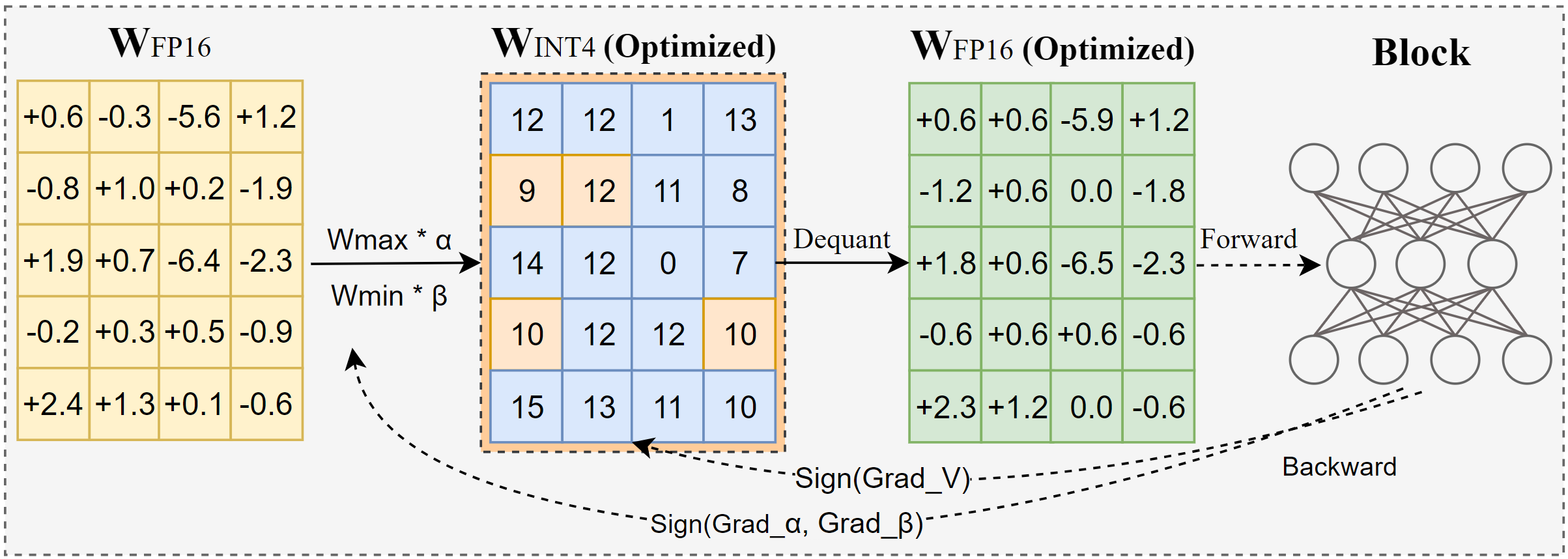
Despite its strong performance, AutoRound is fast and lightweight — quantizing a 72B model takes just 37 minutes on an A100 GPU under light mode. It also supports mixed-bit tuning, lm-head quantization, GPTQ/AWQ/GGUF format exporting, and flexible tuning recipes.
Key Advantages
Superior Accuracy at Low Bit Widths
AutoRound delivers highly promising results, particularly in low-bit quantization scenarios. Evaluations across a variety of tasks show that it outperforms popular methods by a wide margin at 2-bit precision (source). At 4 bits, AutoRound continues to hold a competitive edge in most cases, as demonstrated on the Low-Bit Open LLM Leaderboard.
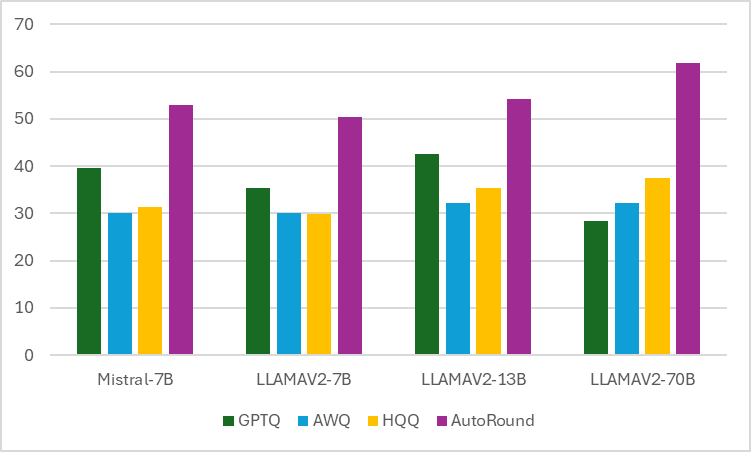
Average of 10+ tasks at W2g128
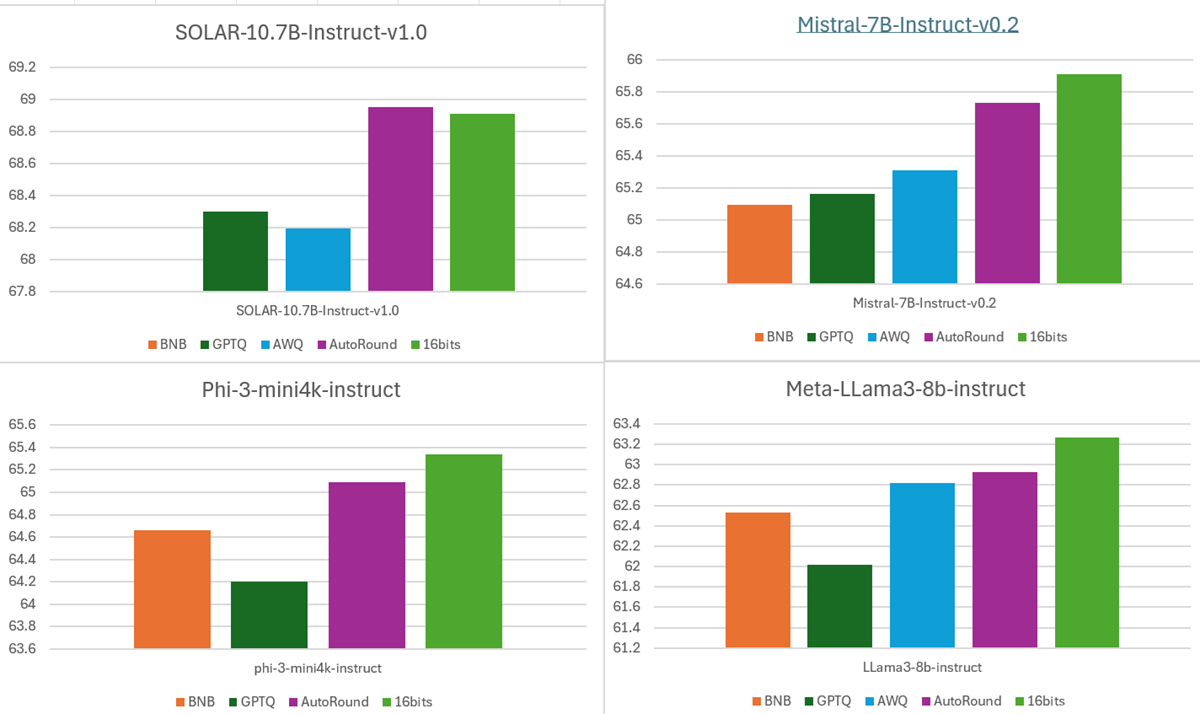
Average of 10+ tasks at W4
2. Broad Compatibility
Models
LLMs: AutoRound supports nearly all popular LLM architectures, including well-known models like Qwen, LLaMA, and DeepSeek. Ready-to-use quantized models are available on Hugging Face through collections such as OPEA, Kaitchup, and fbaldassarri.
VLMs: AutoRound supports over 10 vision-language models (VLMs), including Mistral-Small-3.1, Gemma3, and more. You can find the full list in the README, and ready-to-use quantized models are available in the OPEA Hugging Face collection. For models not yet supported, you can still apply our RTN method with --iters 0. No tuning is required, but some accuracy loss is expected.
Devices
CPU
Intel GPU
CUDA
Quantization Configurations
Int8 Weight Only
Int4 Weight Only
Int3 Weight Only
Int2 Weight Only
Mixed bits Weight only
Export Formats
AutoRound
GPTQ
AWQ
Some GGUFs
3. Flexible/Efficient Quantization
AutoRound requires only 200 tuning steps and a small calibration dataset (as few as 128 samples) to achieve high accuracy. This efficiency translates to faster quantization times and reduced resource consumption compared to other int2 methods, which are more computationally intensive.
AutoAWQ
samples=128
seqlen=512
dataset='pile'
AutoAWQ
samples=512
seqlen=2048
dataset='pile'
GPTQ in Transfomers
samples=?
seqlen=?
dataset='c4'
AutoRoundLight
samples=128
seqlen=2048
dataset='pile-10k'
AutoRound
samples=128
seqlen=2048
dataset='pile-10k'
AutoRound
samples=512
seqlen=2048
dataset='pile-10k
Qwen2.5 3B
7min
17min
13min
3min
8min
9min
Llama3.1-8B
13min
27min
22min
6min
13min
17min
Qwen2.5 72B
105min
230min
OOM
37min
120min
149min
Get Started with AutoRound
Installation
pip install auto-roundQuantization and Serialization
Currently, only offline mode is supported to generate quantized models.
Command Line Usage
auto-round \
    --model Qwen/Qwen3-0.6B \
    --bits 4 \
    --group_size 128 \
    --format "auto_round,auto_awq,auto_gptq" \
    --output_dir ./tmp_autoround
AutoRound also offers another two recipes, auto-round-best and auto-round-light, designed for optimal accuracy and improved speed, respectively.
auto-round-best \
    --model Qwen/Qwen3-0.6B \
    --output_dir ./tmp_autoround
For 2 bits, we recommend using auto-round-best or auto-round. For a comparison of the three recipes, please refer to the table below.
W4G128 Average Accuracy of 13 tasks (mmlu-pro, if_eval, gsm8k, etc) and Time Cost Results (Testing was conducted on the Nvidia A100 80G using the version of PyTorch 2.6.0 with enable_torch_compile):
Model
Qwen2.5-0.5B-Instruct
Falcon3-3B
Qwen2.5-7B-Instruct
Meta-Llama-3.1-8B-Instruct
Falcon3-10B
Qwen2.5-72B-Instruct
16bits
0.4192
0.5203
0.6470
0.6212
0.6151
0.7229
Best
0.4137(7m)
0.5142(23m)
0.6426(58m)
0.6116(65m)
0.6092(81m)
0.7242(575m)
Default
0.4129(2m)
0.5133(6m)
0.6441(13m)
0.6106(13m)
0.6080(18m)
0.7252(118m)
Light
0.4052(2m)
0.5108(3m)
0.6453(5m)
0.6104(6m)
0.6063(6m)
0.7243(37m)
AutoRound API Usage
This setting offers a better trade-off between accuracy and tuning cost, and is recommended in all scenarios.
from transformers import AutoModelForCausalLM, AutoTokenizer
from auto_round import AutoRound

model_name = "Qwen/Qwen3-0.6B"
model = AutoModelForCausalLM.from_pretrained(model_name)
tokenizer = AutoTokenizer.from_pretrained(model_name)
bits, group_size, sym = 4, 128, True
autoround = AutoRound(
    model,
    tokenizer,
    bits=bits,
    group_size=group_size,
    sym=sym,
    # enable_torch_compile=True,
)

output_dir = "./tmp_autoround"
autoround.quantize_and_save(output_dir, format='auto_round,auto_awq,auto_gptq')
For the best/light settings of AutoRound for API usage or mixed-bit configurations, please refer to AutoRound README
Inference
AutoRound automatically selects the best available backend based on the installed libraries and prompts the user to install additional libraries when a better backend is found. For more details, please refer to HF README or AutoRound README.
CPU/Intel GPU/CUDA
from transformers import AutoModelForCausalLM, AutoTokenizer

model_name = "OPEA/Qwen2.5-1.5B-Instruct-int4-sym-inc"
model = AutoModelForCausalLM.from_pretrained(model_name, device_map="auto", torch_dtype="auto")
tokenizer = AutoTokenizer.from_pretrained(model_name)
text = "There is a girl who likes adventure,"
inputs = tokenizer(text, return_tensors="pt").to(model.device)
print(tokenizer.decode(model.generate(**inputs, max_new_tokens=50, do_sample=False)[0]))
Convert GPTQ/AWQ to AutoRound
Most GPTQ/AWQ models can be converted to the AutoRound format for better compatibility and support with Intel devices. Please note that the quantization config will be changed if the model is serialized.
from transformers import AutoModelForCausalLM, AutoTokenizer, AutoRoundConfig

model_name = "ybelkada/opt-125m-gptq-4bit"
quantization_config = AutoRoundConfig()
model = AutoModelForCausalLM.from_pretrained(model_name, device_map="cpu", torch_dtype="auto",
                                             quantization_config=quantization_config)
tokenizer = AutoTokenizer.from_pretrained(model_name)
text = "There is a girl who likes adventure,"
inputs = tokenizer(text, return_tensors="pt").to(model.device)
print(tokenizer.decode(model.generate(**inputs, max_new_tokens=50, do_sample=False)[0]))
Conclusion
Contributions to AutoRound are welcome and greatly appreciated! Whether it's fixing bugs, improving documentation, adding new features, or suggesting improvements, your help is always valued.
If you encounter any issues with auto-round, please open an issue on the AutoRound repository.
Acknowledgement
We would like to thank the open-source low-precision libraries including AutoGPTQ, AutoAWQ, GPTQModel, Triton, Marlin and ExLLaMAV2, whose CUDA kernels are used in AutoRound.